
Custom market shelves
Group your selected markets by product, region, route or any workflow you choose. Reorder them at any time.
Introducing My Desk
Stop jumping between market pages. Build a personal commodity market desk with the benchmarks you follow, the charts you need and a layout that works for you.
Follow markets across
One desk, built around you
Create a focused view of the markets that matter to your work. My Desk organizes CommodityScope’s published assessments into your own daily workspace.
Group your selected markets by product, region, route or any workflow you choose. Reorder them at any time.
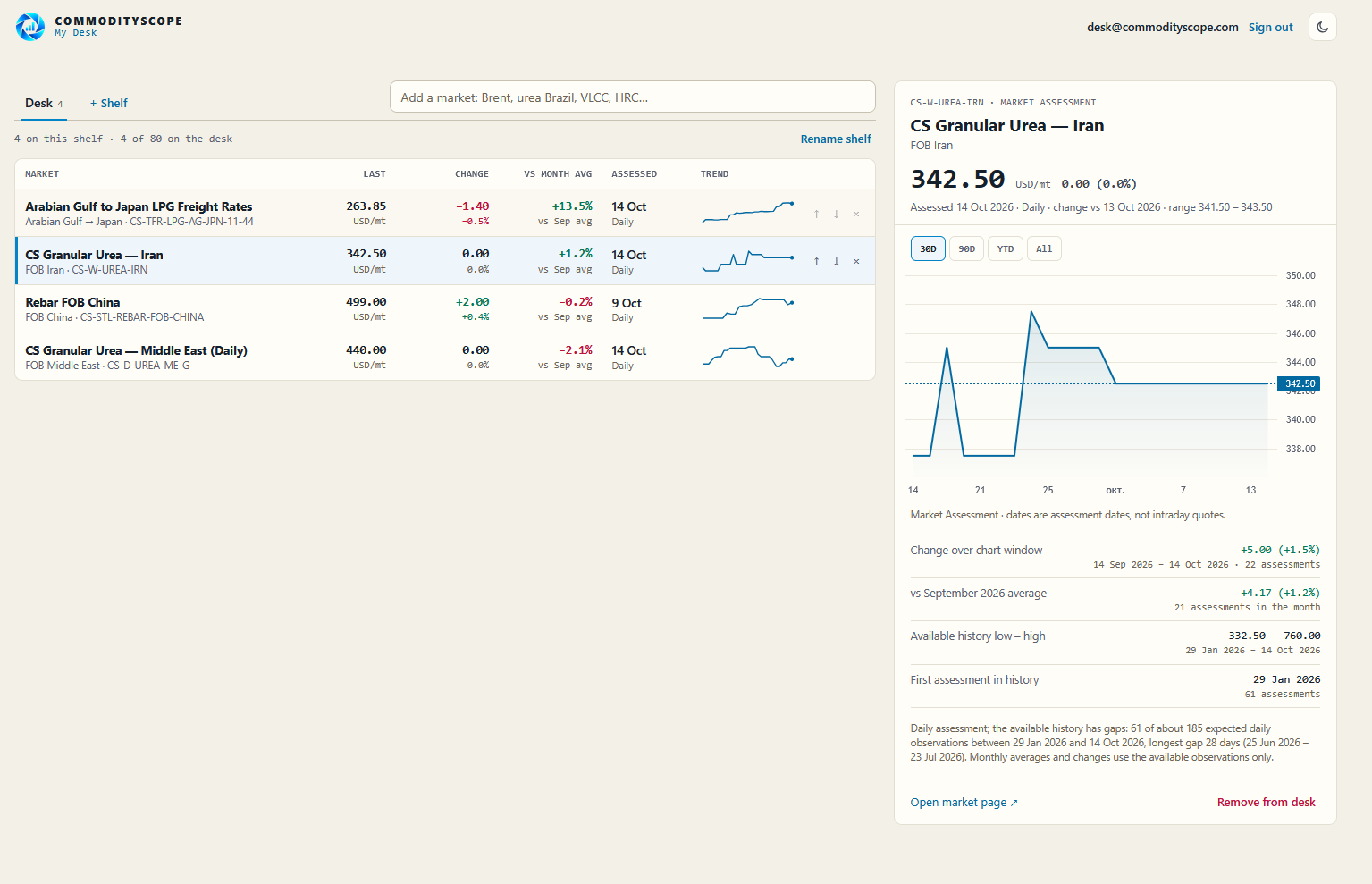
Follow the latest published assessment, unit, assessment date, change and compact trend for every market on your desk.
Open a market to explore its available historical assessments, comparison periods and published market context.
Your shelves, selection and layout stay synchronized when you sign in on another device.
Designed for market professionals
Switch from a fast market overview to the detail behind a published price without losing your place.
Review price moves, publication dates and sparklines from a dense, readable market table.
Explore a selected market’s available history and published statistical context in the detail panel.
Create shelves for energy, freight, fertilizers, agriculture or any combination of published markets.
Simple from the first minute
Register with your email and confirm it using the link we send you.
Find your benchmarks and add them to the shelves you create. Arrange your desk in the order you prefer.
Sign in from another browser or device to find the same saved market shelves and charts.
My Desk, wherever you work
CommodityScope My Desk is available as a Progressive Web App (PWA). On supported browsers, add it to your desktop or home screen for convenient one-tap access.
Installation options depend on your browser and device. Updated assessments require an internet connection.
Questions & answers
Straight answers before you create your account.
Yes. My Desk is currently free to use and does not require a paid subscription.
No. My Desk displays CommodityScope’s published indicative market assessments with their dates, publication frequency and available historical data. Assessments are not executable bids or offers and should not be presented as intraday quotes.
Yes. You can put published markets from energy, refined products, agriculture, fertilizers, freight and steel into the same desk and organize them into shelves.
Yes. Sign in with the same CommodityScope account to access your saved shelves and markets from another browser or device.
No. My Desk works in your browser. Installation as a PWA is optional and depends on browser and operating-system support.
Each series follows its published assessment schedule. Some are daily; others are weekly or use another frequency. My Desk displays the relevant assessment date and type, so you can see how recent a value is.
Build a focused commodity workspace in minutes. Free to use.
Published assessments are indicative market information, not intraday executable quotes.